-2.png?width=100&height=100&name=Learning%20Genie%20Logo%20(400%20x%20400)-2.png)
This article shows you how to quickly remind parents to submit their In-Kind contributions and prompt staff to review and approve those submissions in Learning Genie.
With just a few simple steps, you can keep your non-federal match data on track, reduce paper chasing, and ensure your In-Kind reports remain audit-ready.
Follow the steps below to send reminders to parents who haven’t submitted their In-Kind and to staff with pending approvals:
-
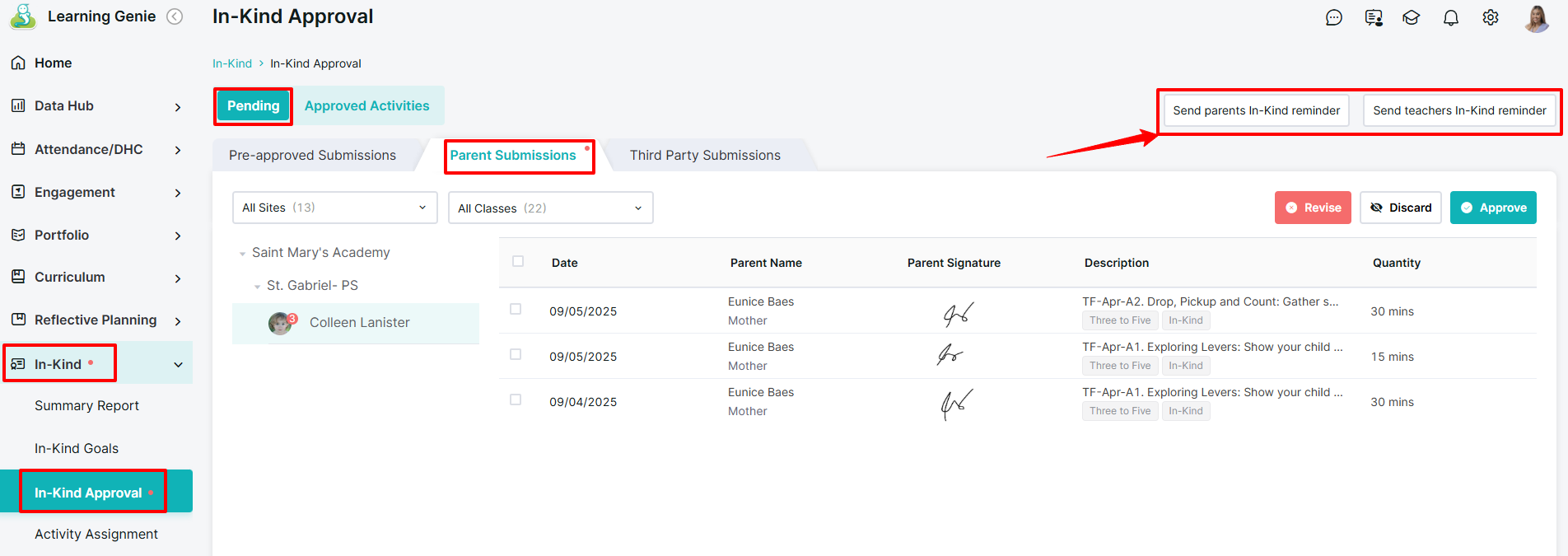
Navigate to the In-Kind menu and select In-Kind Approval.
-
Go to the Pending section → Parent Submissions.
-
Choose which reminder to send: Parents or Teachers.
4. Review the reminder message and make any updates before confirming Send.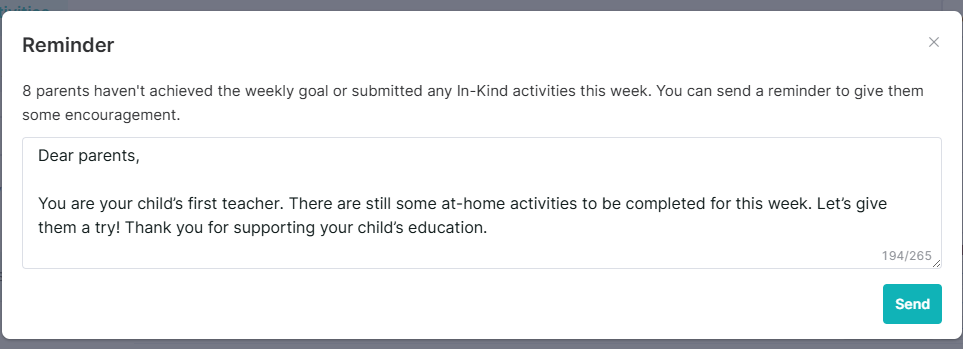
By following these steps regularly, you can ensure timely In-Kind submissions and approvals, keeping your records accurate and audit-ready. Consistent reminders help parents and staff stay on track, making In-Kind reporting easier for everyone.
Need Help?
If you run into issues or have questions, the Learning Genie Support Team is here for you!
Email: help@learning-genie.com
Phone: 760-576-4822