-2.png?width=100&height=100&name=Learning%20Genie%20Logo%20(400%20x%20400)-2.png)
Curriculum Genie (CG) supports four staff roles: District Owner, District Admin, School Admin, and Teacher. These roles govern staff's ability to manage core data and access content within the platform. Administrators can also use batch updates to efficiently manage multiple accounts simultaneously.
Staff Roles and Core Data Access
The roles have defined authority for managing core organizational data, including Schools, Staff, Students, Sections, and Terms.
| Data Management Area | Roles with Full Access (Create, Edit, Delete, View) |
|---|---|
| Schools | District Owner/Admin |
| Staff | District Owner/Admin. School Admin can manage Teachers within their own school (create, edit, view, delete). |
| Students | District Owner/Admin, School Admin, and Teacher can create, edit, delete, and view student records. |
| Sections | District Owner/Admin and School Admin. |
| Terms | District Owner/Admin and School Admin. |
Note on Sync Restrictions: For any data synced automatically from Clever or ClassLink, manual edits are restricted. Changes made manually will be overwritten during the next nightly sync, so updates must be made in Clever or ClassLink instead.
Enhanced Permission Tiers for Content Management
Administrators can use enhanced permission management to easily manage staff access with precise, configurable tiers. These permissions specifically determine user actions within the Unit Planner.
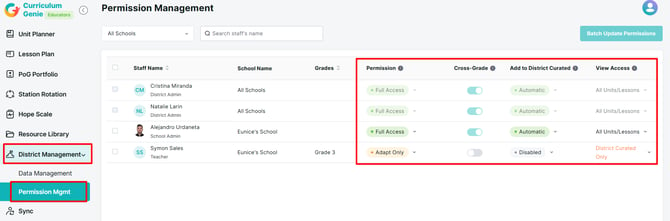
The four primary configurable permissions are:
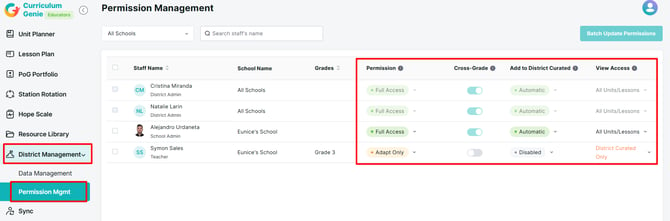
- Permission: Sets the access level of staff (e.g., Full Access, Adapt Only, Enhance Only, View Only).
- Cross-Grade: Determines whether staff can view content outside their assigned grade levels.
- Add to District Curated: Allows staff to manually add self-created units to the district-wide curated library.
- View Scope: Limits visible content to either all units or only district-curated content.
Permission Level Comparison
Permissions determine the types of actions users can perform in the Unit Planner:
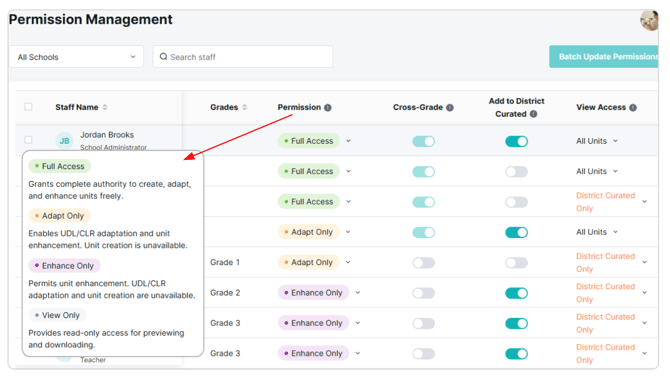
- Full Access: Grants complete authority to create, Adapt UDL and CLR, and enhance units freely.
- Adapt Only: Enables UDL/CLR adaptation and unit enhancement, but unit creation is unavailable.
- Enhance Only: Permits unit enhancement, while UDL/CLR adaptation and unit creation are unavailable.
- View Only: Provides read-only access for previewing and downloading content.

Curriculum Genie's permission powers give admins total control to keep data tidy and content creation customized! With defined roles and flexible access tiers, you can effortlessly manage your team, sync data automatically, and ensure everyone has the keys to create awesome, future-ready lessons.
Please reach out to us if you have any questions!
help@learning-genie.com
(760)576-4822